ReMarkable 2 review: How is the paper tablet?

ReMarkable 2 review: How is the paper tablet?
A tablet is usually considered to be a device with a colour screen, a camera, and support for multiple apps. But the ReMarkable 2 is nowhere close to the traditional tablet that you have seen or used. It's a paper tablet, which has been designed with a certain vision. It is touted as a digital alternative to paper and is aimed at a certain category of people.
According to the Norwegian startup, the tablet has been designed to cater to what it calls "knowledge workers". These are people who still depend on paper for their work - be it for writing or sketching. They include business executives, office workers, and creative professionals.
The company believes this tablet can help users focus on their tasks and save them from the distractions of notifications and the desire to use other apps.

The ReMarkable 2 takes a novel approach, but is the product as good as the thought behind it? Let's find out.

How's the design?
)
US vs China over South China Sea: Washington backs Philippines, Beijing hits back
)
Bigg Boss 20: Isha Rikhi evicted after three weeks in Salman Khan’s show
)
Musk plans to more than double xAI's chips to over 1.2 million Nvidia GPUs by year-end
)
After JU, clash erupts at SRFTI: BJP’s ‘Dimagi Naxal’ jibe sparks political firestorm after students protest RSS-linked event
)
‘Anti-social elements spreading false rumours’: LPU issues statement amid massive unrest over alleged rape
)
LPU students go on rampage, vandalise campus amid widespread protest: What's happening
)
Trump asked Xi to pressure Iran. China did not say yes — here’s what Beijing wants
)
US Treasury Secretary Scott Bessent hails global crackdown on Iranian banks and airlines
)
An OpenAI agent escaped its locked test cage again, by hiding questions in DNS lookups
)
'Our video was trimmed': LPU girls who featured in rape-denial video make U-turn
)
3 males killed, four others injured in shooting after fight at strip club in Detroit
)
'Victory for low-budget consumers': Raghav Chadha hails 30-day telecom recharge rules
)
Claude rebuilt the 1989 game 'Prince of Persia' by reusing the original's own code
)
Beyond metros: How Tier-2 and Tier-3 cities could drive India’s next AI wave
)
Tesla builds first Cybertruck with its own refined lithium: Elon Musk's $1 billion Texas bet pays off
)
IndiGo flight suffers tail strike in Bengaluru while landing; DGCA to probe incident
)
The US and China set up an AI 'red telephone', but skipped the rulebook
)
‘Terror suspects arrested near UK air base were looking to do big damage’: Trump
)
Russian envoy claims US tactics to contain India were revealed in ‘Freudian slip’
)
IND vs WI 1st ODI: Kohli breaks Sachin's most runs in one country record with unbeaten 139 as India thump West Indies by 8 wickets
)
Researchers rebuilt exactly how 700 AI agents hacked Hugging Face: a 900-link chain trick
)
‘Olympic inclusion is our major target’: WPA President Ishaun Singh on pool’s global ambitions
)
Nations League: Spain sink England at Wembley; Modric shines for Croatia
)
Why has Iran released no proof of life of Mojtaba Khamenei? Araghchi reveals...
)
'What kind of confession is this?': Pakistan PM Shehbaz Sharif’s 'terrorists would be roaming New York' remark goes viral, raises alarm online. Watch
)
South Korea demands apology from Ukraine over North Korean prisoners' transfer
)
Beyond BrahMos: India targets Rs 50,000 crore in defence exports with unmatched price edge
)
Sri Lankan Tamil migrant worker gets death sentence in Saudi Arabia, help sought from India
)
Muslim marriage cannot shield sex with minor wife from prosecution under POCSO: Delhi HC
)
'Can't help but draw painful parallels to Nirbhaya case': SC on latest incidents of rape cases in Delhi-NCR
)
99.9% more powerful - Scientists find boy who can recall memories from just 3 months of age
)
'FIRST LOOK from inside Noah’s Ark': Researchers share video from inside mysterious mound in Turkey
)
UNSC reform momentum grows: Russia, Portugal, Mauritius push for India's permanent seat bid
)
8 US marines injured in Iranian missile attack on vessel in Strait of Hormuz: Report
&im=FitAndFill=(700,400))
New OTT releases this week (September 28-October 4, 2026): Dupahiya 2, Pooja Meri Jaan, Ohh My Dog- 5 titles coming on Netflix, Prime Video and more
)
Afghanistan says 28 fighters killed in clash near Pakistan border, Islamabad denies
)
Ceuta migrant crisis: Protesters take to streets as Spain grapples with migrant challenge
)
LPU suspend classes, postpones exams as violence escalates over rape claims: What's happening
)
New York City wants a 'kill switch' on every AI, and will pay whistleblowers who report violations
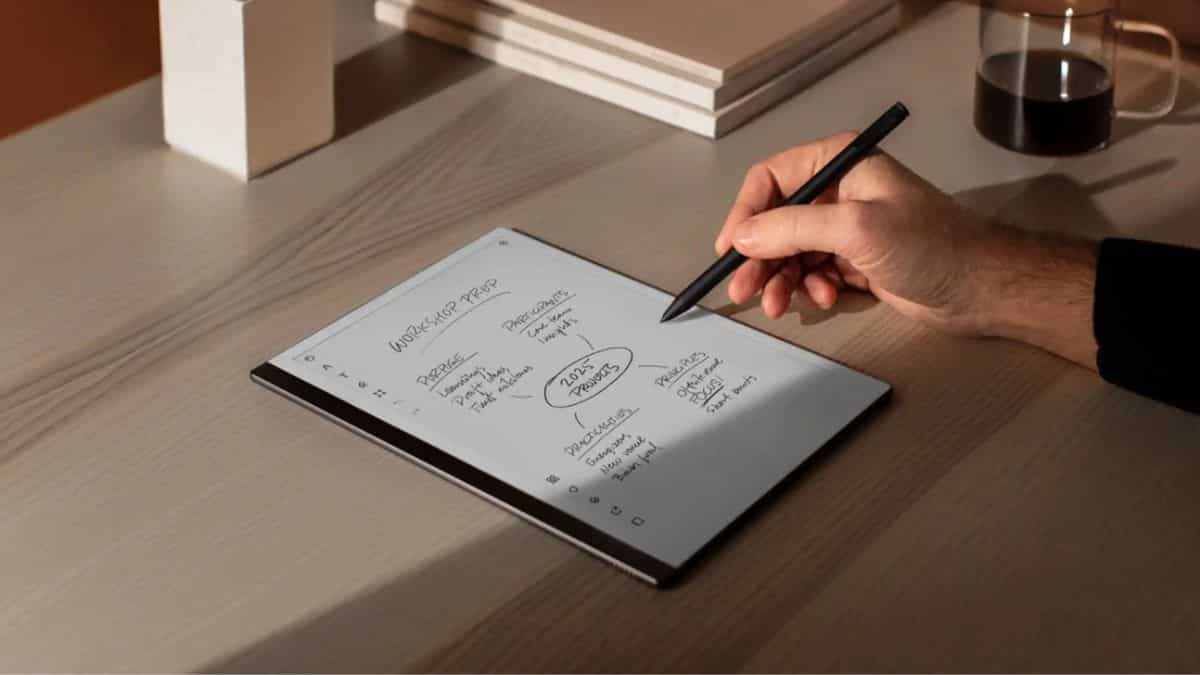
The first thing you notice about the ReMarkable 2 is its premium build quality. Encased in an aluminium frame, it looks elegant. Its lightweight design and slim profile add to the ergonomics. You can comfortably hold and use it for long periods.
Measuring 4.7 mm thick, the ReMarkable 2 is claimed to be the world's thinnest tablet. All of these factors make it portable. So, you can easily slip it into your bag and comfortably carry it with you.
The front of the tablet is dominated by a 10.3-inch monochrome display which is pleasing to the eyes and gives you enough room to comfortably write, read, and doodle.
I quite like its aesthetics and the minimalist approach that has gone into designing the product.
While I understand the absence of a backlight in the ReMarkable 2, the lack of it requires a mention. I think that no backlight could turn some users off.
Watch: Rise in online gaming scams | WION Tech It Out
How's the performance?
It's easy to set up the paper tablet. As you turn it on, you are asked to follow a few simple steps. This doesn't take long.
As you switch on the tablet, you are treated with a host of features. I must say, the interface is clean and intuitive. You easily get a hang of the tablet and its functionalities as you spend some time with it.
Its USP is the writing feature. There are different templates of pages for you to choose from. There’s everything from ruled pages for handwriting to a weekly schedule for planning your week. Pages can be as long or as short as you like. When you reach the end of a page, you can use a single swipe upward to get more space. You can also pick a pen as per your note-taking needs. The tablet offers a wide range of precise and adjustable writing tools that respond to the tilt and pressure of your hand. Interestingly, the tablet comes with a precise writing tool called the Marker Plus. There is no latency in writing and the strokes are quite fine. Overall, The writing experience is responsive.
While I appreciate the efforts that have gone into offering a paper-like writing experience, I think there is still some scope for improvement. The writing experience could be enhanced to be a bit smoother.
The tablet is loaded with a host of cutting-edge features.
The tablet allows you to convert your handwritten notes into typed text. It does so quite accurately. So, you can easily use your handwritten notes in emails, reports, or presentations by turning them into text.
Arranging notes is as easy as taking notes in this digital notebook. You can organise them using different tags and keep them in separate folders. There are gestures available for you to navigate the notebook. This helps you easily find what you’re looking for.
Among other features, there is a provision to combine handwritten and typed notes. The device can be attached to a keyboard. This comes in handy when you don't want to take notes and instead want to type. Called Type Folio, the slim keyboard enables comfortable and focused typing for users. You can even adjust the position of the Type Folio.
You must know that you can access your documents across devices. Their mobile and desktop apps let you view and organise your notes from your other smart devices.
The tablet is also engineered with palm-rejection technology that allows you to place your palm on the screen while writing or drawing without registering unwanted inputs.
As it's focused on reading and writing, it doesn't disturb you with notifications or calls.
Talking about the battery, it offers around 12 days of battery life on a single charge.
It comes with an option of unlimited cloud storage. You can access it by subscribing to the ReMarkable Connect membership.
The company promises regular software updates, which means you can expect new features and enhancements in the years to come.
How much does it cost?
It's priced at Rs 43,999 for the bundle that includes the ReMarkable 2 and Marker Plus. Also, you will have to spend an extra Rs 19,499 if you want to buy the Type Folio.
Verdict
The sophisticated tablet aims to help people leverage the benefits of paper in a digital form while avoiding the pitfalls of modern technology. Having said that, this digital notebook is a niche product; it's not for all. Given its high pricing and limited usage, the company may find it difficult to appeal to a large number of people. We wish it was priced a little lower to attract potential customers.