Google AI mode now helps students plan, read, and ask smarter questions: Here’s what’s new in Google AI mode

&imwidth=600&imheight=450&format=webp&quality=medium "Google AI mode now helps students plan, read, and ask smarter questions: Here’s what’s new in Google AI mode")
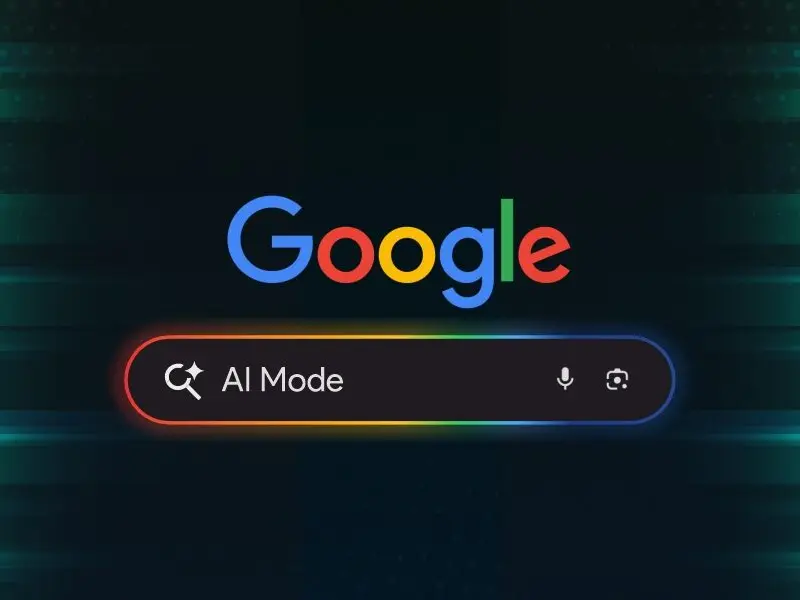
Google AI mode now helps students plan, read, and ask smarter questions Photograph: (Google)
Recently, Google announced that they are adding new features to AI Mode in Search, including PDF reading, real-time video input, and a new planning tool called Canvas. These updates aim to help students and users get smarter, interactive answers. Read full details below.
Google adds PDF, video and planning features to AI Mode in Search
Google is rolling out new updates to its AI Mode in Search, The new features aim to help students, teachers, and everyday users get more out of their searches by combining AI with useful tools like PDF reading, real-time video input, and a new planning tool called Canvas.
The new AI Mode features were announced on Google's official blog and it is now being gradually introduced to desktop and mobile users, especially those enrolled in the Search Labs programme.
Ask questions using images and PDFs
One of the key updates is the ability to ask questions about images and PDFs. Already available in the Google app for mobile, this feature is now coming to desktop browsers. Users will be able to upload PDF files such as lecture slides or study materials - and ask follow-up questions.
AI Mode will read the document and cross-check information from across the web to give detailed answers. Support for more file types, including Google Drive files, is expected soon.
Make study plans with Canvas
Google has also introduced Canvas, a tool that helps users organise information and build plans across multiple sessions. For example, if a student needs to prepare for an exam, they can ask AI Mode to create a study guide. Clicking “Create Canvas” will open a side panel that updates in real-time based on new inputs and files. Canvas aims to make it easier to manage tasks like revision, project planning or even holiday prep. Users can add personal context using uploads such as syllabi or class notes.
Real-time answers with Search Live
Trending Stories
&imwidth=280&imheight=210&format=webp&quality=medium)
&im=FitAndFill=(700,400)&imwidth=280&imheight=210&format=webp&quality=medium)
&im=FitAndFill=(700,400)&imwidth=280&imheight=210&format=webp&quality=medium)
&imwidth=280&imheight=210&format=webp&quality=medium)
&imwidth=280&imheight=210&format=webp&quality=medium)
&imwidth=280&imheight=210&format=webp&quality=medium)
&imwidth=280&imheight=210&format=webp&quality=medium)
&imwidth=280&imheight=210&format=webp&quality=medium)
&imwidth=280&imheight=210&format=webp&quality=medium)
&imwidth=280&imheight=210&format=webp&quality=medium)
&imwidth=280&imheight=210&format=webp&quality=medium)
&imwidth=280&imheight=210&format=webp&quality=medium)
&imwidth=280&imheight=210&format=webp&quality=medium)
&imwidth=280&imheight=210&format=webp&quality=medium)
&imwidth=280&imheight=210&format=webp&quality=medium)
&imwidth=280&imheight=210&format=webp&quality=medium)
&imwidth=280&imheight=210&format=webp&quality=medium)
&imwidth=280&imheight=210&format=webp&quality=medium)
&imwidth=280&imheight=210&format=webp&quality=medium)
&imwidth=280&imheight=210&format=webp&quality=medium)
&imwidth=280&imheight=210&format=webp&quality=medium)
&imwidth=280&imheight=210&format=webp&quality=medium)
&im=FitAndFill=(700,400)&imwidth=280&imheight=210&format=webp&quality=medium)
&imwidth=280&imheight=210&format=webp&quality=medium)
&imwidth=280&imheight=210&format=webp&quality=medium)
&imwidth=280&imheight=210&format=webp&quality=medium)
&imwidth=280&imheight=210&format=webp&quality=medium)
&imwidth=280&imheight=210&format=webp&quality=medium)
&imwidth=280&imheight=210&format=webp&quality=medium)
&imwidth=280&imheight=210&format=webp&quality=medium)
&imwidth=280&imheight=210&format=webp&quality=medium)
&imwidth=280&imheight=210&format=webp&quality=medium)
&imwidth=280&imheight=210&format=webp&quality=medium)
Another major addition is Search Live with video input, which uses Google Lens to provide answers in real-time. This feature allows users to point their camera at something like a math problem or science experiment and ask a question. The AI will analyse the live feed and reply with relevant explanations, including links for deeper reading. This feature is part of Google's broader Project Astra initiative and is now being tested in the US.
Learn more while browsing
AI Mode is also being connected to Google Lens in Chrome. Soon, when users click the Chrome address bar, they’ll see an option to “Ask Google about this page.” For example, if a complex diagram appears in a PDF or website, users can ask for more explanation and receive a summary in the side panel, along with follow-up support using AI Mode.
Designed for learning and discovery
Google’s updates aim to make AI more accessible and helpful, especially for students. By blending traditional search with visuals, file uploads and real-time input, the tech giant hopes to improve how people explore and understand information online.
These tools are being gradually rolled out, with more features expected in the coming months.
